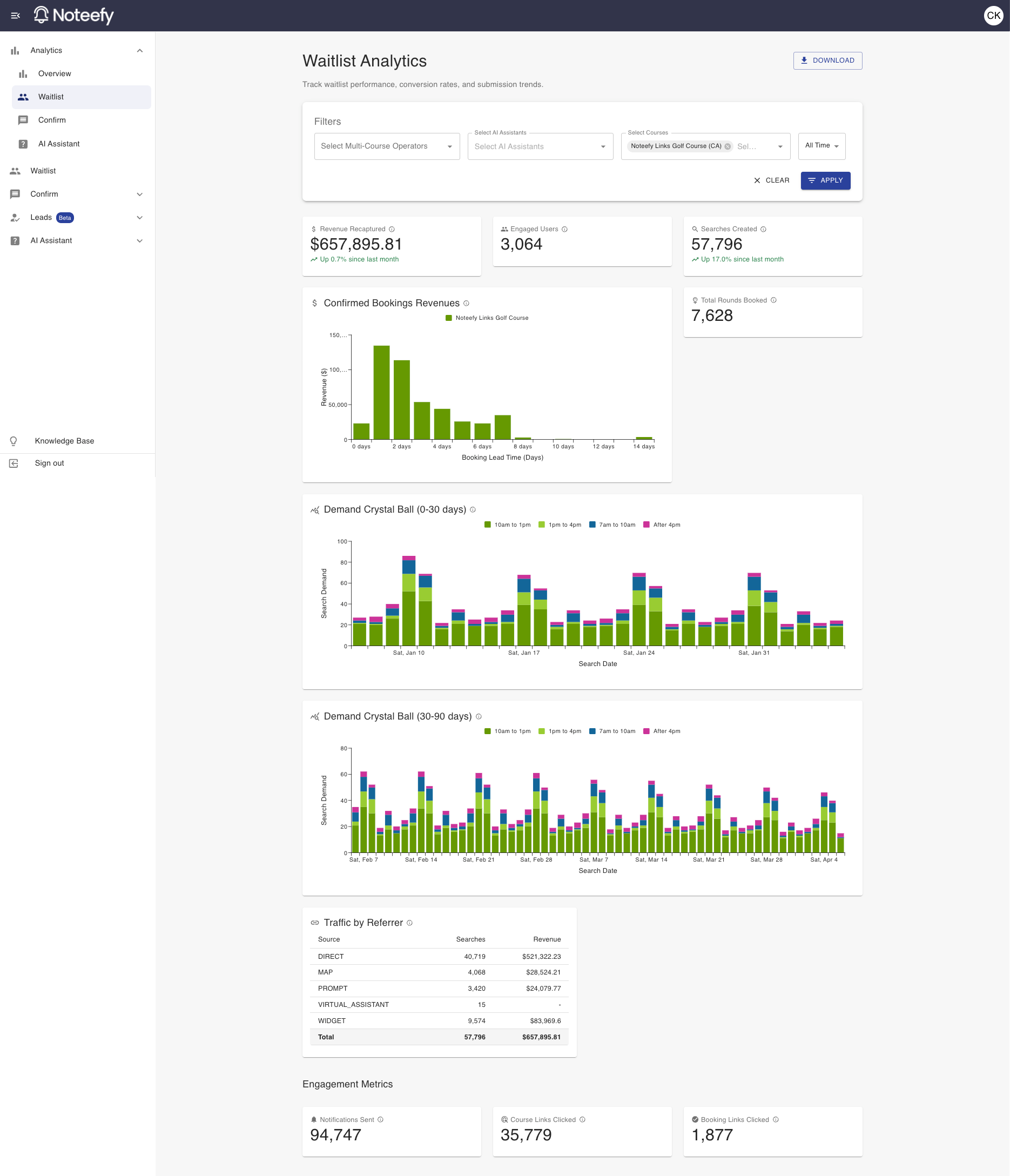
Noteefy’s Waitlist Analytics gives you visibility into how your course is performing with Noteefy’s Waitlist product. Use this data to make smarter decisions, optimize operations, and elevate the golfer experience.
🧠 Looking at the data you want
Use the filters at the top of the page to focus on the data most relevant to you—by course (if you manage multiple) or by time range.
- If you have access to only one course, it will be selected by default.
- By default, the dashboard shows data for the full time period since Noteefy was activated at your course.
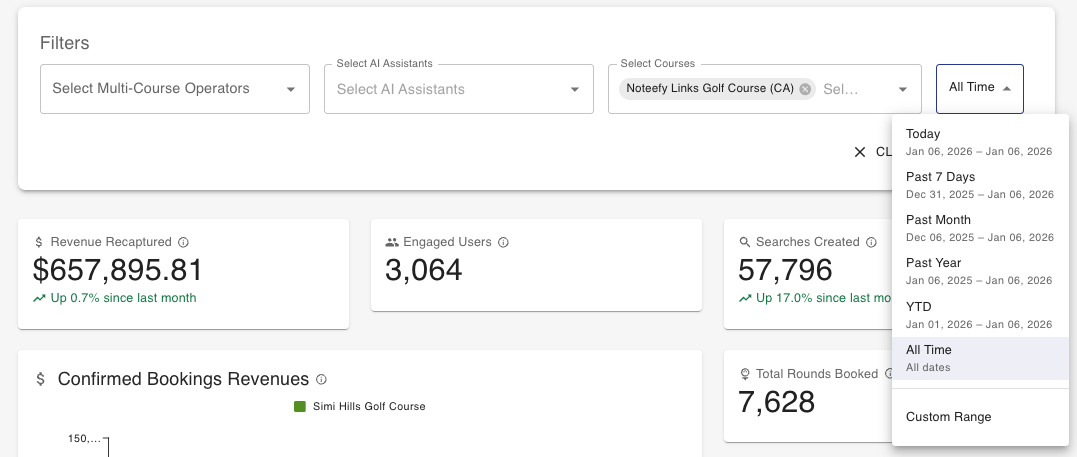
- To narrow the view, click the ‘All Time’ dropdown. Choose a preset (e.g., “Past 7 Days,” “Past Month”) or set a Custom Range.
- Click Apply to have the data begin loading if it isn’t loaded already
🛠️ Understanding the Metrics
The dashboard includes metrics that show how Noteefy is impacting your operations. Here’s what each report means:
- Revenue Recaptured: Total revenue generated from bookings made through waitlist notifications, calculated using booking prices and the RevPOTT multiplier.
- Engaged Users: Total number of unique users who either created a search or got a notification within the selected period.
- Searches Created: Total number of waitlist searches created by golfers during the selected period.
- Total Rounds Booked: Total number of golf rounds booked through waitlist notifications during the selected period.
- Confirmed Bookings Revenues: Revenue breakdown by course from confirmed bookings made through waitlist notifications. This chart shows when the booking was made relative to the actual tee time. So, for example, revenue showing as ‘0 days’ would be tee times that were booked on the same day of playing (and ‘1 day’ would be tee times booked one day prior to playing, and so on).
- Demand Crystal Ball (0-30 days & 30-90 days): Distribution of waitlist searches by days in advance, showing demand patterns for future tee times.
- Traffic by Referrer: Breakdown of waitlist searches and revenue by referral source, showing which channels drive the most engagement. Revenue is calculated using confirmed booking prices and the RevPOTT multiplier.
- Notifications Sent: Total number of waitlist notifications sent within the selected date to golfers about available tee times. A notification is only counted if it was sent within the selected date range.
- Course Links Clicked: Total number of times golfers clicked on course links back to the tee sheet from waitlist notifications. A click is only counted if it occurred within the selected date range.
- Booking Links Clicked: Total number of times golfers clicked on booking confirmation links from waitlist notifications. A click is only counted if it occurred within the selected date range.
💡 Downloading & Sharing Your Results
Want to share your Noteefy performance with others on your team—or for a board meeting?
Click the Download button in the upper-right corner of the dashboard to generate a PDF. The PDF includes all waitlist reports filtered down to how you are looking at it in the app. Use this to showcase wins, inform strategy, or report results to leadership.
📞 Need Help?
Your Customer Success Manager can help you get started or review your setup.
📧 Email: customersuccess@noteefy.app