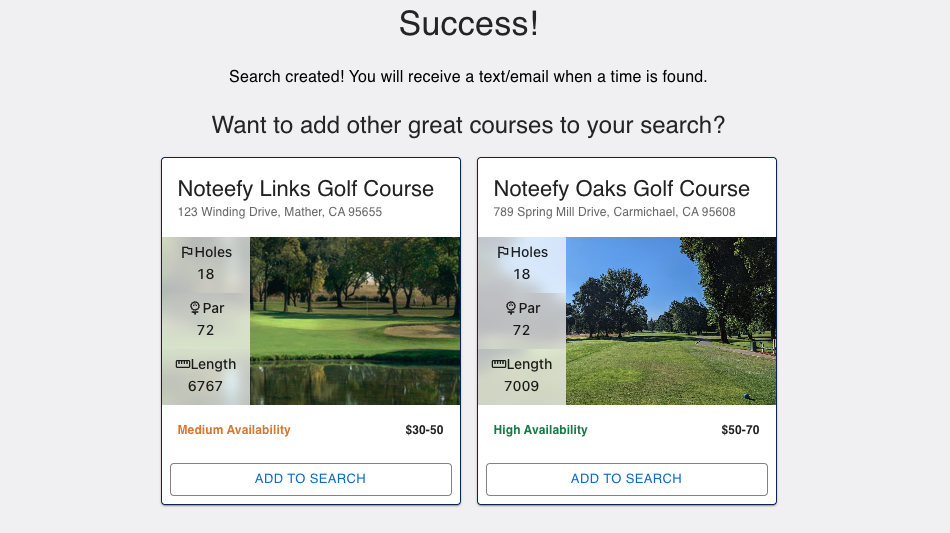
Want to highlight a sister course or recommend a nearby partner? The Featured Courses option helps golfers discover more places to play right from your waitlist user flow.
📍 What Are Featured Courses?
- Featured Courses appear at the start and/or end of a golfer’s waitlist experience.
- They’re perfect for:
- Promoting co-owned or managed courses.
- Suggesting nearby alternatives when a course is booked.
- Driving traffic to lesser-known or recently launched properties.
✅ How It Works
- Shown during:
- Start of Journey: When a golfer begins searching for tee times.
- End of Journey: After submitting their alert preferences.
- Courses appear with:
- Name and location
- A direct link to join the waitlist at that course
- Optional brief description or highlight (e.g., “Just 5 minutes away” or “Try our sister course with ocean views”)
🔧 How to Enable Featured Courses
- Reach out to your Noteefy Customer Success Manager with:
- List of courses to feature
- Any specific order or grouping (Start or End of journey)
- URLs or branding notes
- We'll set it up and test for a seamless experience.
💡 Tips for Success
- Highlight courses close in distance or similar in experience.
- Use compelling descriptions: “More tee times, same great service.”
- Keep it updated—rotate seasonal course promotions or offers.
📞 Need help setting this up? Just email customersuccess@noteefy.app, we’ll handle the heavy lifting.
Adding Featured Courses to Drive New Demand