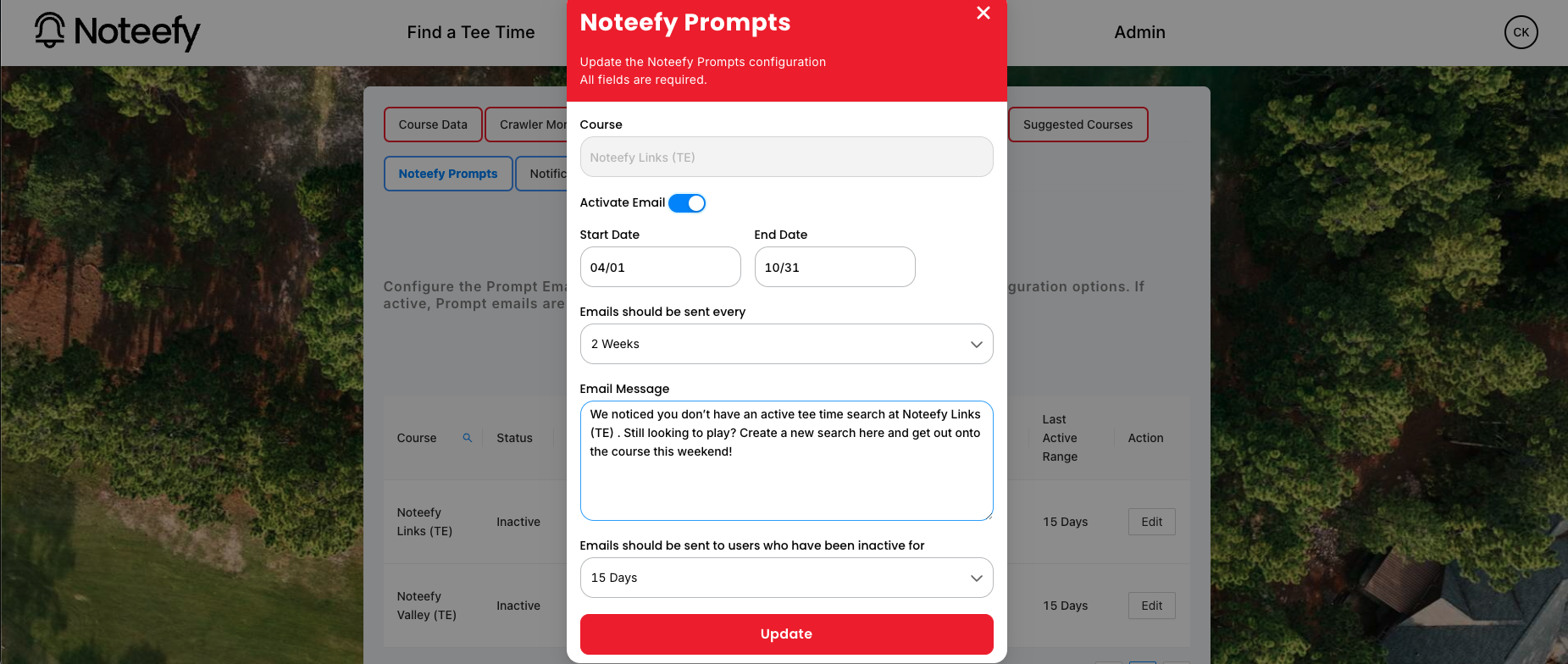
Prompts are automated marketing emails that help re-engage golfers who haven’t used the waitlist in a while. Think of them as gentle nudges that say: “Still looking to play this weekend?”
💡 What Are Prompts?
- Prompts are email-only reminders sent to golfers who haven’t used the waitlist recently.
- They’re great for:
- Encouraging weekend bookings.
- Staying top of mind with casual or seasonal players.
- Driving return visits without adding staff work.
🕒 When Do They Send?
- Prompts are sent on Wednesday’s by default.
- You can set:
- How often the emails go out (e.g., every 2 weeks).
- How long a golfer must be inactive before qualifying (e.g., no activity for 15 days).
- Custom start and end dates for seasonal messaging (e.g., April–October).
✍️ What Do They Say?
You can fully customize the message. Here's a sample:
“We noticed you don’t have an active tee time search at Noteefy Country Club. Still looking to play? Create a new search here and get out onto the course this weekend!”
⚙️ How to Set Up Prompts
Anyone with access to the Noteefy Admin Portal can configure Prompts:
- Log into the Admin Dashboard.
- Go to the Demand Generation tab.
- Click “Edit” next to the course.
- Toggle Activate Email ON.
- Set:
- Start & end dates
- Send frequency (e.g., every 1 or 2 weeks)
- Inactivity threshold (e.g., 15 days)
- Custom message
- Click Update to save.
💬 Tips for Success
- Use seasonal prompts to re-engage golfers before peak weekends.
- Keep the tone friendly and action-oriented.
- Test different messages to see what gets the most re-activations.
Need help setting up or testing a prompt? Contact customersuccess@noteefy.app and we’ll guide you through it!